Create Once, Repurpose Everywhere: AI Workflows for Content Multiplication

Updated: Dec 10, 2025
You've got more ideas than hours in the day, and you want to keep showing up without burning out. AI Content Repurposing!
Here's the thing: with AI helping you create and remix content, one solid idea can turn into dozens of useful pieces across video, audio, blogs, emails, and social posts.
Content repurposing is pretty easy—you create one core piece, then chop it up into smaller bits for different platforms. It saves you time, money, and mental energy.
The 2025 toolkit is honestly simpler than you'd think: ChatGPT and Custom GPTs help you nail the words and keep your brand voice consistent; Opus Clip pulls out highlight clips and adds captions; Castmagic turns your podcasts into transcripts and summaries; Canva Magic Studio handles your designs; Synthesia creates AI videos in multiple languages; and Midjourney and Ideogram generate images.
Here's how it works: you start with one pillar piece, draft it using AI, then break it down into reels, posts, emails, blog articles, and graphics. You'll get clear steps, ready-to-use prompts, and quality checkpoints so everything stays polished and sounds like you.

Your Simple AI Content System: Plan One Idea, Produce 20+ Assets. AI Content Repurposing
You can run this weekly without stress. The outcome is one core piece, then 20 to 40 repurposed assets, in under 4 hours.
Core tools: ChatGPT with your brand voice, a shared content calendar, and a simple folder naming system.
Core output: one pillar piece, then a batch of shorts, posts, emails, a carousel or PDF, and a few image posts.
Core workflow: plan, draft, slice, polish, publish, measure, adjust.
Pick Your Pillar Format and Define the Hook
Choose the format that fits your style:
A 20 to 40 minute video if you like face-to-camera
A 20 to 40 minute podcast if you prefer audio
A 1,200 to 2,000 word blog if you think best in text
Fast prompt for ChatGPT to build your outline:
“You are my content planner. Topic: [your hook]. Create an outline with 3 to 5 sections, 2 stories or examples, and a clear CTA. Add search-friendly subheads.”
Lock Your Brand Voice With a Reusable Prompt or Custom GPT
Set your voice once so every draft sounds like you. Paste a short voice guide into ChatGPT or build a Custom GPT. Include:
Audience: who you help, what they want, and their pain points
Tone: plain language, short sentences, confident, warm
Offers: your main service or product and a default CTA line
Rules: sentence length 8 to 18 words, avoid jargon, avoid buzzwords, use active voice
Banned words: synergy, unlock, disrupt, comprehensive, solution, ecosystem
CTA lines: “Book a call.” “Get the checklist.” “Reply if you want the template.”
Save 3 on-brand samples as references. Ask ChatGPT to mirror those samples before each new draft.
Map One Idea Into Many Assets
Asset Type | Quantity | Hook or Angle | Needed Elements | Status |
Short videos | 5 to 10 | Best tips or hot takes | Quotes, captions, CTA | |
Social posts | 5 to 10 | Story, step, myth vs fact | Stats, screenshots, pull quotes | |
Emails | 1 to 3 | Summary, quick win | Link, PS, offer line | |
Carousel or PDF | 1 | 5 steps or checklist | Icons, numbers, bold headers | |
Image posts | 3 to 5 | Quotes, stats, visuals | Photo or AI graphic, alt text |
Note visuals, quotes, stats, or steps needed. Then collect everything in one folder before you start drafting.
Turn Longform Into Reels, Posts, and Emails With AI (Fast)
Start with one video or blog. Then produce short clips, captions, threads, and emails in batches. Use AI to speed up, then do a quick human pass.
Opus Clip finds highlights, auto-crops vertical, and adds captions and titles.
ChatGPT drafts posts and emails in your voice.
Canva Magic Studio creates graphics fast and resizes for each channel.
Clip Standout Moments in Minutes With Opus Clip
Upload your long video. Let Opus Clip pick 5 to 10 highlights. It will auto-crop for vertical formats and add captions. Customize with your color bar and logo.
Tips that boost results:
Keep clips 20 to 45 seconds
Start with a strong line from your transcript
End with a clear call to action, for example “DM me ‘plan’ for the template”
Write Social Posts and Emails With ChatGPT
Feed ChatGPT your transcript or outline, your brand voice prompt, and your goal. Ask for:
5 Instagram posts, 5 LinkedIn posts, 5 X posts
2 short emails, one summary and one story
Prompt idea:
“Use my brand voice. Goal: drive discovery and replies. From this transcript, write 15 social posts. Vary hooks: story, step-by-step, myth vs fact, quick win. Add one offer line that feels natural. Then write 2 short emails with a single CTA.”
Make sure each post points to a simple next step. Keep captions short and scannable. Use line breaks and 1 emoji if it fits your style.
Batch Your Visuals in Canva Magic Studio
Set up your Brand Kit with colors, fonts, and logo. Pick 2 to 3 templates for reels covers and carousels. Bulk-generate captions where it helps, then edit for tone.
Fast path:
Use Magic Studio to clean backgrounds and match brand colors
Resize for Instagram, TikTok, LinkedIn, and YouTube covers
Export to a dated folder

Visuals at Scale: Midjourney, Ideogram, and Canva AI
You can create eye-catching images without a big team. Use each tool for what it does best.
Midjourney for unique scenes and styles
Ideogram for concept images and clean text inside images
Canva AI for quick on-brand graphics and batch output
Keep rights and brand safety in mind. Avoid prompts with brand logos. Review usage terms for AI images.
Create On-Brand Concepts With Midjourney and Ideogram
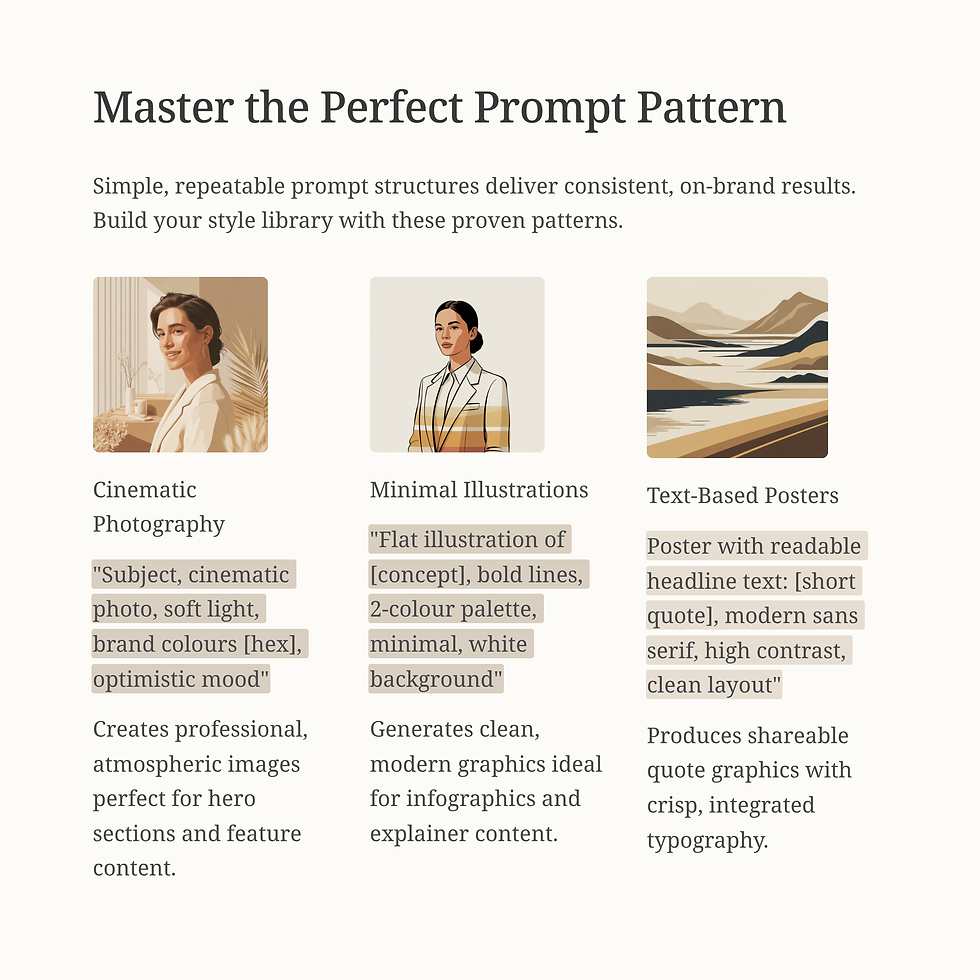
Use simple prompt patterns that include subject, style, color, and mood. Save a small style library.
Prompt patterns:
“Subject, cinematic photo, soft light, brand colors [hex], optimistic mood”
“Flat illustration of [concept], bold lines, 2-color palette, minimal, white background”
“Poster with readable headline text: [short quote], modern sans serif, high contrast, clean layout”
Check faces and hands for oddities. Edit or regenerate if needed. Keep text short so it stays crisp.
Make Post-Ready Graphics in Canva Magic Studio
Import AI images into Canva. Apply your Brand Kit. Use 2 to 3 reusable templates for quotes, tips, and carousels. Keep text big and readable on mobile.
Fast setup:
One quote template
One tip template
One carousel template with 5 slides
Export to platform sizes and save to your dated folder.
Quick Reference: 2025 Tool Highlights
Use the right tool for the job. Here is a fast guide to core features you will use most.
Tool | What You Will Use It For in 2025 |
ChatGPT Custom GPTs | Saved voice, rules, memory, file uploads, repeatable workflows |
Opus Clip | Auto highlight detection, vertical crops, captions, quick publishing |
Castmagic | Transcripts, summaries, chapters, show notes, quotes |
Canva Magic Studio | Design suggestions, text-to-image, instant resize, background remover |
Synthesia | AI avatar videos, many languages, voice options, simple edits |
Midjourney | Unique scenes, styles, high-quality images, style mixing |
Ideogram | Images with clean in-image text, posters, logo-style concepts |

Conclusion
One idea can fuel many assets when you use clear AI workflows. Your core toolkit covers every step: ChatGPT and Custom GPTs for voice and drafts, Opus Clip for clips and captions, Castmagic for transcripts and notes, Canva Magic Studio for graphics, Synthesia for AI videos, and Midjourney or Ideogram for images. Here is your action plan for next week: pick one pillar topic, draft it with ChatGPT, clip highlights in Opus Clip, design 3 to 5 posts in Canva, and send one email. Save the checklists, run this system for four weeks, track results, and keep the pieces that perform best. Thanks for reading, and reply with your pillar topic if you want quick feedback.


Comments